01
Accuracy
Support careful entry and faithful presentation of diagnostic information.
Designing an offline-first reporting workflow for diagnostic laboratories.
DiaReport is an offline-first diagnostic laboratory report generator designed to help laboratory professionals document test results and generate structured reports when internet connectivity is unavailable or unreliable.
It’s designed around a common laboratory workflow: capturing patient information, recording investigations and results, reviewing the information, and generating a final report. Rather than relying on continuous internet access, DiaReport allows users to complete the core reporting workflow offline and save the generated report locally to their device.
DiaReport provides a structured workflow for laboratory professionals to enter patient and test information and generate clear diagnostic reports.
DiaReport organizes patient details, investigations, results, units, and reference ranges in a clear format to make laboratory information easier to review and document accurately.
DiaReport is designed with offline use in mind, allowing laboratory professionals to continue generating reports when internet connectivity is unavailable or unreliable.
DiaReport transforms entered laboratory data into a structured diagnostic report that can be reviewed and saved locally to the user’s device for access when needed.
The problem
Laboratory professionals may need to document and communicate patient results even when internet connectivity is unreliable or unavailable.
When the reporting path depends entirely on online systems, connectivity interruptions can delay documentation and disrupt the sequence from completed test to a readable report. DiaReport explores a focused offline alternative for that specific moment.
Users & context
The design was informed by the structure of laboratory reporting workflows and the need for accurate, readable diagnostic documentation.
Primary user
Documents completed investigations and prepares diagnostic information for clinical communication.
From sample context to clinical communication
Design challenge
The challenge was designing a workflow supporting accuracy, clear information hierarchy, error prevention, offline use, fast documentation, and patient information privacy.
Support careful entry and faithful presentation of diagnostic information.
Keep patient, investigation, result, and report details visibly distinct.
Use required fields, review, and feedback to reduce incomplete reports.
Keep the primary report generation workflow available without connectivity.
Prioritize the reporting sequence and reduce unnecessary navigation.
Limit unnecessary exposure while handling identifiable information.
User flow
The sequence keeps each stage focused, then introduces review before generation so incomplete information can be identified while it is still editable.
Final screens
Prototype screen stories move from report creation through local saving, including offline continuity and recoverable validation states.
Screen 01
Purpose
Provide a simple starting point for creating a diagnostic report.
Design rationale
Prioritize the primary task and avoid unnecessary navigation.
1 / 7
Design decisions
Each decision supports a specific constraint of offline laboratory documentation rather than adding features around a conventional dashboard.
Core reporting remains available without an active connection.
Patient, investigation, result, and report information remain visibly distinct.
Each stage introduces the information needed for that point in the reporting sequence.
Parameters, values, units and reference ranges align for scanning.
Users can identify missing or incorrect information while it is still editable.
The generated file is stored in the device’s Downloads folder.
Navigation demo
A guided walkthrough shows how the offline-first workflow, clear hierarchy, and structured reporting stages work together in the live interface.
Open DiaReportPrototype note: the web app is not yet deployed and is only a prototype.
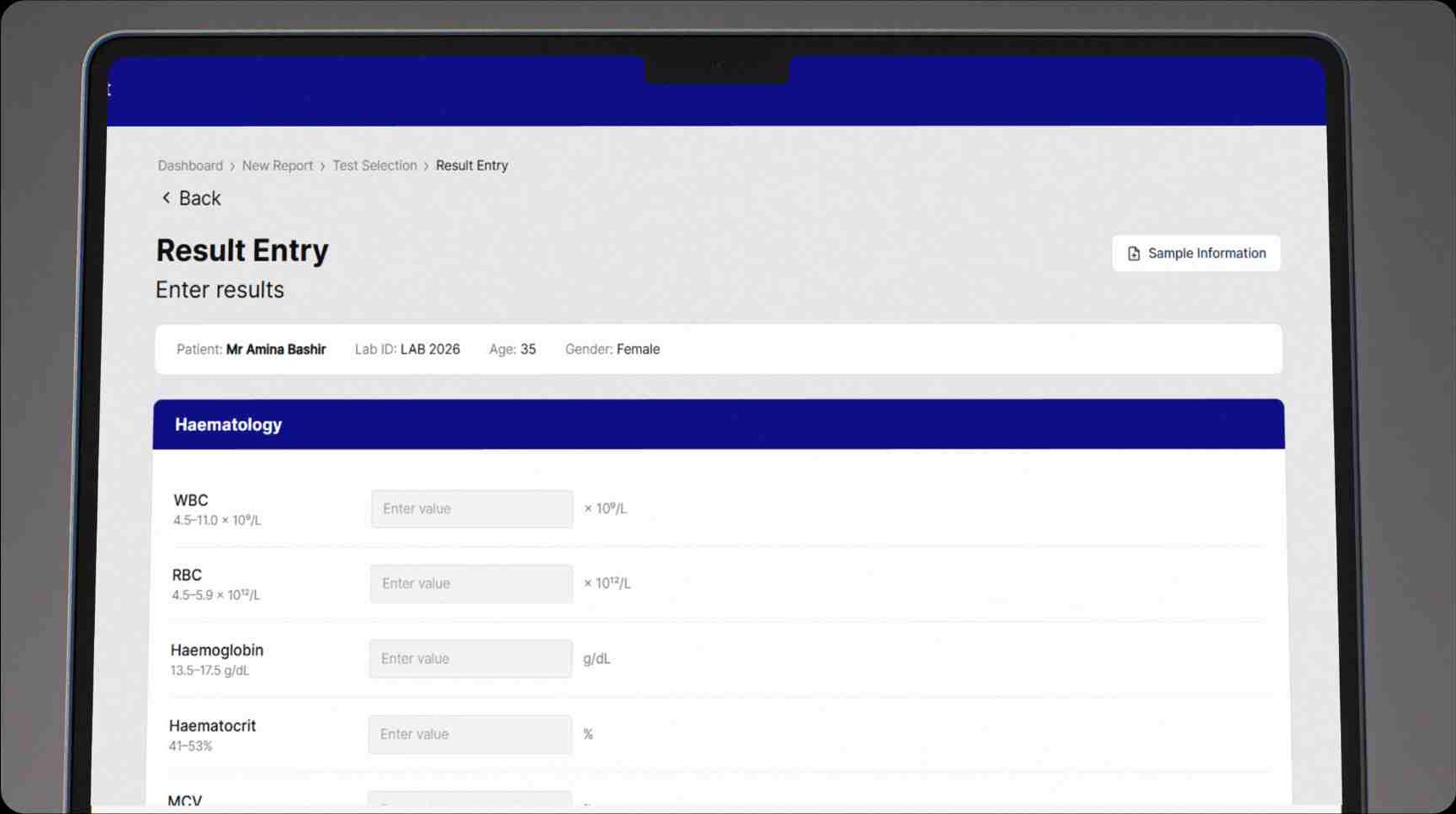
DiaReport Navigation walkthrough
Watch demoReflection / outcome
DiaReport explored how an offline-first reporting workflow could support laboratory documentation during connectivity disruptions. The project strengthened my approach to designing healthcare products around accuracy, workflow constraints, privacy, and error prevention rather than treating healthcare interfaces as conventional forms and dashboards.
Next projects
START WITH THE ESSENTIALS
A useful brief does not need to be perfect.
A little context is enough to begin.
Share the problem, the people involved, and the outcome you're hoping for. If there is a timeline or an existing product, include that too.
EMAIL ME DIRECTLY
ALL FIELDS HELP SHAPE A USEFUL REPLY